
Important Update: The Nevada Registry mobile app has been retired and replaced by the Self-Add Attendance method for recording training attendance.
Nevada Registry Members!
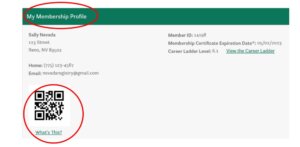
We are excited to announce a new feature to expedite attendance taking for in-person training sessions! When you log into your account through the Online Portal you will notice a new QR code below your name on the ‘My Membership Profile’ tab of your membership account. These codes are tied to your unique Registry ID number and may be scanned at in-person training sessions to have your name easily added to the attendance record at the end of the training. Below is an example of what a QR code looks like and where you will find yours.
Soon, all trainers will have access to The Nevada Registry’s Trainer Attendance App* allowing them to enter attendance using the QR Code (in addition to entering your Registry ID, or name/email address manually if needed).
Get Ready!
Since the QR code can only be accessed by logging into your Nevada Registry Online Portal account it is recommended to take a screenshot of the code so you can easily access and present it to the trainer at your next in-person training where the mobile app is in use.
*The Nevada Registry Trainer Attendance App is available to approved trainers only. If you are not a trainer you will not be able to log in through the app. Saving a copy of your unique QR code to your mobile device will help expedite the attendance taking process at future Registry-approved events.